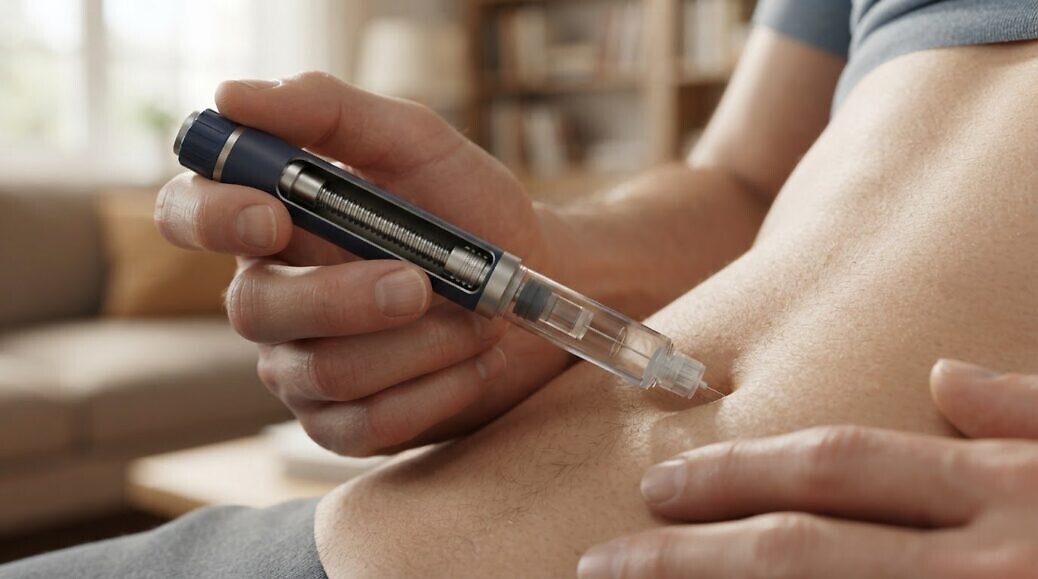
A device’s most important feature may be the one a camera cannot show. 3D animation for medical devices uses a sequence of computer-generated images to explain how equipment works, how it is used and how its features relate to scientific processes or structures beneath the visible surface. It can make internal mechanisms and interactions clear in ways that filming alone cannot.
That distinction matters when a still image or live demonstration leaves essential details hidden. A carefully structured animation can show a device from different angles, reveal components in sequence and make complex information easier to follow, without losing sight of technical accuracy.
This article explains what medical 3D animation is and how it can communicate device features, operating techniques and scientific processes. You’ll also learn how animation can visualise structures that conventional filming cannot capture, and how the right level of detail helps shape a clear, purposeful explanation for your audience.
Key Takeaways
- Use animation when a device’s operation or internal mechanism needs to be explained in sequence rather than in a single still image.
- Match the level of scientific detail to the audience, from technical training to a broader product explanation.
- Use virtual views, transparency and movement to reveal structures and interactions that conventional filming cannot capture.
- Plan each animation around its intended use, whether for training, presentations, conference displays or digital platforms.
- Build the visual narrative around the device’s features and function so viewers can follow how it works and why those details matter.
WHAT IS A 3D MEDICAL ANIMATION?
A 3D medical animation uses computer-generated images arranged in sequence to explain a device, process or medical concept. Unlike a still illustration, it can show movement, assembly and operation over time.
Uses across presentations and digital channels
One animation can support presentations, training materials, conference displays, websites and virtual reality experiences. Its format should suit the setting: a presentation may need a concise sequence, whilst a training module can devote more time to each operating step.
For example, a conference display can introduce a device’s purpose, then show its key components in motion. On a website, the same concepts can be arranged into a clear product explanation. In virtual reality, viewers can explore a computer-generated view from different perspectives.
Medical animation also supports healthcare education. A medical student can follow how a device relates to the human body, whilst a healthcare professional can review an operating technique. The intended audience determines the terminology, pace and level of anatomical detail.
In marketing, animation can explain a product or innovation before it takes physical form. It can also present scientific concepts that are difficult to communicate through a live demonstration alone. For each channel, consider what viewers need to understand and which sequence will make the information clear.
Medical device demonstrations
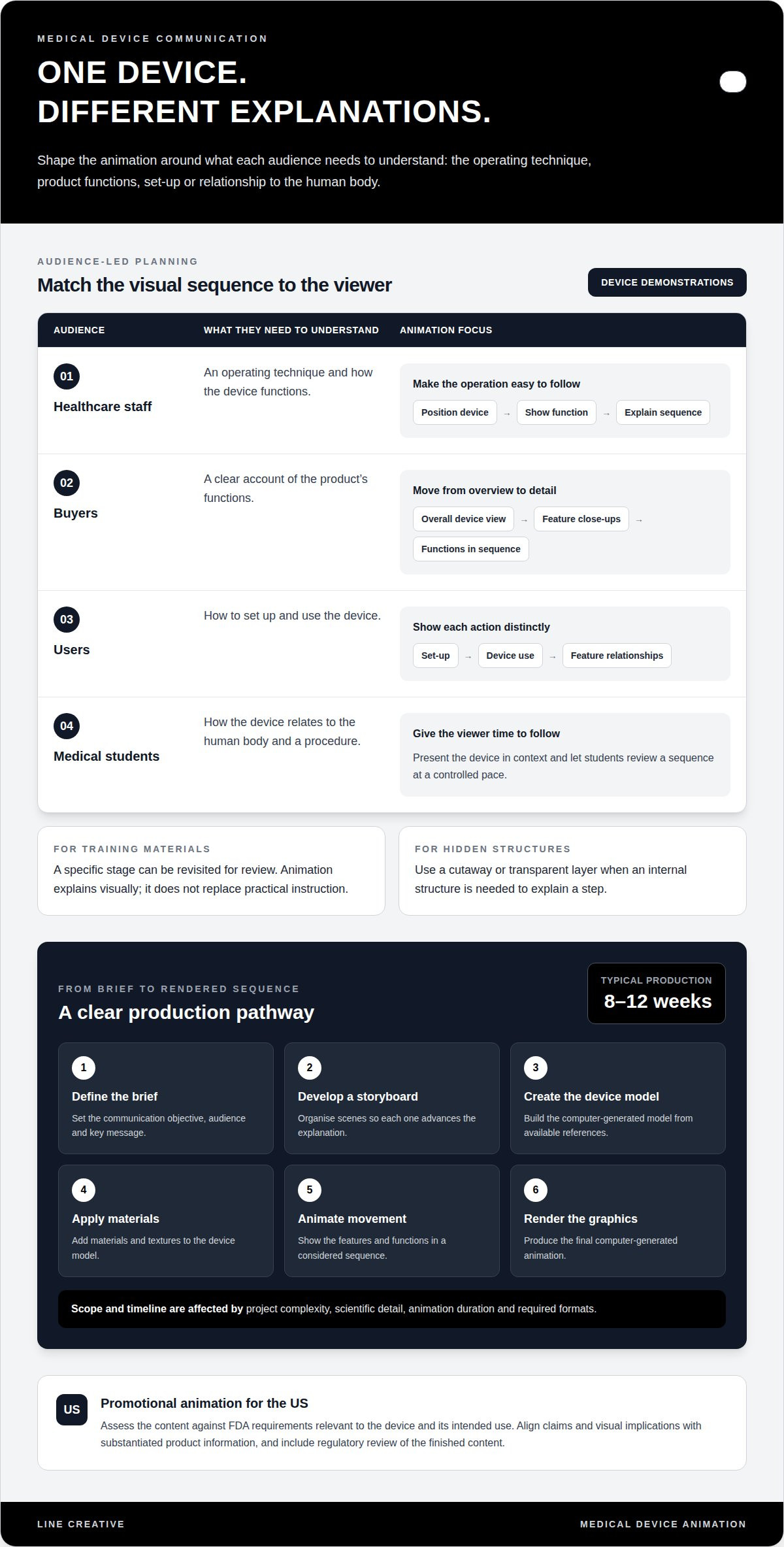
A device demonstration can move from an overall view to close-ups of individual features. For example, an animation might show how a component connects, how the device is positioned and how its functions work in sequence. Make each step visually distinct so viewers do not have to infer how the parts relate.
This approach can support training for healthcare staff, clients, buyers and users. Healthcare staff may need to understand an operating technique, while buyers may need a clear account of a product’s functions. Users benefit from a sequence showing setup and use. These are different communication goals, so tailor the script and level of detail to the audience.
Surgical training and planning can use animated views to explain a procedure or demonstrate how equipment is used. Medical students can study a sequence at a controlled pace, while training materials can return to a specific stage for review. Animation explains visually, but does not replace practical instruction.
Producing the animation involves defining a project brief, developing a storyboard and rendering the computer graphics. A device model is created, materials and textures are applied, and movement is animated to explain features and functions. The project’s complexity, scientific detail, duration and required formats affect production scope and timeline; production typically takes 8-12 weeks.
For promotional use in the US, assess the animation against FDA requirements relevant to the device and its intended use. Align its claims and visual implications with substantiated product information, and include regulatory review of the finished content.
When choosing a studio, assess its ability to interpret technical information, build an accurate device model and turn the intended message into a clear storyboard. Review the audience, scientific detail and final formats together before production begins.
3D medical animation for explaining devices and scientific processes
A carefully developed animation can connect a device’s physical design with the scientific action it performs. It can move from an external view to a cutaway, then show how components interact with anatomy or biological processes. This sequence helps viewers follow cause and effect, rather than treating complex visuals as decoration.
Pharmacology animations can explain a mechanism of action by tracing how a therapeutic interacts with a molecular target. A sequence might show binding, a resulting cellular change and its subsequent effect. Each stage should distinguish established scientific information from visual simplification, helping the audience understand the concept without mistaking an illustrative model for direct observation.
Anatomy and biological-process visualisation can place a device within relevant structures of the human body. For example, an animation can show a catheter advancing through a vessel or illustrate how tissue responds around an implanted component. Layers, labels and controlled movement clarify spatial relationships that a flat diagram may leave ambiguous. Match the level of detail to the viewer’s knowledge and the point being explained.
Operating techniques and surgical procedures can be presented as a sequence of actions. A planned camera view can show instrument position, movement and the relationship between the device and surrounding tissue. If a step depends on an internal structure, reveal it through a cutaway or transparent layer. This makes the visuals useful for explaining procedure flow while keeping the scientific focus on the device or technique.
For device and procedure visualisation, start with the communication objective: explain a component, demonstrate an interaction or clarify a process. Then organise the visuals into a storyboard and check that each scene advances that objective. A device might appear assembled first, separated into components next, then placed in its operating context. This structure connects product design with scientific function.
To prepare for production, provide available device models or drawings, product imagery and technical or scientific reference material. Include the intended audience, key message, required scenes, preferred output format, resolution and aspect ratio. These details help define model fidelity and the animation’s delivery requirements.
When assessing visual direction, review CGI animation examples for how they communicate form, movement and detail. A strong scientific sequence gives every visual a clear explanatory purpose.
Visualising structures that conventional filming cannot capture
Conventional filming records visible subjects, but cannot directly capture molecules, cells, synapses or neurons. Three-dimensional animation can construct these biological subjects and place them in a visual sequence, making hidden structures available for explanation.
Consider a device that interacts with tissue beneath the skin. An animated view can show the external equipment first, then transition through transparent layers towards the relevant anatomy. Repositioned body parts and changing camera angles can clarify where components sit and how nearby structures relate. These are constructed visuals, not footage of a procedure inside the body.
Complex mechanisms also benefit from visual separation. A sequence can isolate individual components, then show how their movements or interactions connect. For instance, an animation might depict a device part engaging with a target structure, using labels and directional movement to explain each stage. This can make an educational explanation more engaging than a dense diagram, while keeping every visual tied to the scientific message.
Anatomical and physiological visualisation can connect structure with function. A view of a vessel, for example, can show its shape before illustrating how a device moves through it. A cutaway can reveal surrounding tissue, while controlled colour and motion distinguish one structure from another. This helps patients and healthcare audiences follow spatial relationships that ordinary video cannot record directly.
Patient education can use animation to explain a procedure and outline recovery stages, such as immediate post-procedure care followed by later milestones. The sequence should communicate general information clearly, not predict an individual patient’s outcome. In clinical settings, healthcare practices such as Local Foot Doc often rely on clear visual guidance and anatomical models to help patients understand surgical steps, expected outcomes and recovery routines.
For surgical education, animation can reconstruct an operating view without filming a patient. It can show instrument position, tissue layers and a procedural sequence, then pause on a critical movement for closer explanation. Medical students can use the same visual structure to connect anatomy with procedural action. Accuracy depends on the reference material and scientific review behind each scene.
Three-dimensional animation can reveal internal structures and controlled movement. Motion graphics can clarify data, labels and abstract pathways, while live-action video records real people, equipment and settings. A combined approach can use live footage for context, then animated sequences for hidden anatomy or mechanisms a camera cannot capture.
Before production, define what the audience must understand, which structures need to appear and where the animation will be used. These decisions shape the camera path, anatomical detail and visual transitions. The result can be a focused educational tool, provided each constructed image supports the explanation rather than implying direct clinical evidence.
How 3D medical animations demonstrate medical-device utility and features
A device’s utility becomes clearer when viewers can see how its design supports its function. An animation can move from the complete product to a component, then demonstrate how that part operates in sequence. This gives each feature a defined purpose and connects product form with use.
For example, a device animation can show assembly, positioning and operation in distinct stages. A close-up can identify a control or moving part, while labels clarify what changes when it is activated. Explain product benefits by showing the functions they support, rather than relying on broad claims. Keep every scene aligned with the device’s actual operation and intended use.
Medical illustration can communicate anatomy or a device’s structure in a single frame. Animation adds timing and movement, helping to explain sequences such as a component opening, a tool advancing or a mechanism engaging. Simulations can illustrate how a device is designed to work, but should not be presented as clinical evidence or a substitute for validated performance information.
A browser-based 3D demonstration can let a viewer rotate a device, inspect components and select labelled features. This format suits product pages and educational platforms where viewers need to explore at their own pace. Clear controls, concise labels and a defined viewing path help keep interaction purposeful. The essential test is whether each selectable view answers a question about the product’s construction or function.
Interactive content can also extend a linear animation. A viewer might select an external component to see its position, then open a cutaway view to examine how parts connect. Each interaction should preserve context: show the whole device before focusing on a detail, and identify which component the viewer is inspecting. This structure makes exploration easier to follow without implying that every internal view represents a directly observed clinical process.
For surgical devices, a demonstration can show instrument orientation, movement and interaction with surrounding anatomy. A sequence might establish the operating view, follow the instrument’s path, then pause on a key movement. These scenes can support training or product education, provided they distinguish illustrative visuals from real-world procedural instruction.
Before production, define the audience, intended purpose, essential features and final delivery format. Build the sequence around those priorities: establish context, explain operation and close with the device’s relevant features. A focused storyboard helps keep secondary details from obscuring the core message.
If your device needs a clear CGI explanation, discuss a visualisation brief with Line Creative for an animation shaped around its features and intended audience.
Line Creative: CGI Animation
Line Creative creates CGI animation and product visualisation to communicate how a product is designed and how its features work. For medical-device teams, this visual approach can help translate device information into a clear sequence for presentations, training or marketing. The work can draw on 3D rendering to establish the device’s form, then use movement and carefully planned views to explain its operation. Turn to Line Creative when still imagery cannot clearly communicate a device’s structure or function, and you need a visual narrative shaped around a specific audience and purpose. The brief should identify the device, essential features, intended viewers and required outputs, giving the animation a defined communication objective. Contact Line Creative to discuss your medical-device visualisation brief.
Shape the next step in device communication
Your next decision is the central message the animation must make clear. Define what viewers need to understand, then align the visual approach with the device, audience and intended use. A 3D animation for medical devices can become a focused communication asset when every scene supports that objective and the scientific content guides the visual choices.
Line Creative’s CGI Animation and 3D Rendering create visual content from product concepts, whilst its Architectural visualisation supports built-environment projects. For a medical-device brief, the priority is a clear visual narrative grounded in the product information and the way you need to communicate it.
Bring the core message and relevant product material into the discussion, then establish a direction for the animation. Contact Line Creative about your animation and take the next step towards a purposeful visual explanation.
Frequently Asked Questions
What is 3D animation for medical devices?
It’s a digital visual asset built from a three-dimensional representation of a device and its surroundings. For a project team, a useful starting point is to decide which parts need detailed modelling and which can remain simplified. That choice affects how viewers interpret scale, assembly and interaction. A clear brief also defines whether the animation explains an existing product, a prototype or a concept in development.
What are the common uses of medical device 3D animation?
Its use depends on the communication task and the viewer’s prior knowledge. A product team might use a sequence to explain a design decision internally, while a distributor may need material to support a product discussion. For a technical audience, retain precise component names; for a general audience, introduce terminology only when it helps explain the device. A defined audience prevents one animation from carrying competing messages.
What claims and risks should medical device animations avoid?
Avoid visual details that imply a capability the device does not have, such as an unsubstantiated level of precision or a guaranteed result. Colour, scale and movement can also mislead if they exaggerate a feature or suggest a measured effect. A practical review checks the storyboard, on-screen labels, narration and final images against product information, especially for claims viewers might infer from the visuals alone.
How can medical device animations be used for marketing, training, and investor presentations?
Set a distinct communication objective for each audience before adapting the material. Marketing can focus on differentiating features; training can emphasise decision points and correct sequencing; investor presentations can clarify the development concept and its assumptions. Keep the core product representation consistent across versions, then adjust the script, annotations and detail. This helps prevent different audiences from receiving conflicting impressions.
What examples of effective medical device 3D animations are available?
Useful examples include a design-development animation comparing a concept with its proposed final form, or a maintenance explainer showing how an authorised technician accesses serviceable parts. A remote-control interface could also be visualised through a sequence of screen states and device responses. These examples work best when each scene answers a specific question and distinguishes intended operation from features that are merely conceptual.