A product image can look polished and still leave its value unclear. Product CGI for marketing works best when product accuracy, campaign story and planned asset reuse are considered together, rather than as separate tasks.
If you need to promote a product before a physical sample is ready, or keep imagery consistent across channels and campaign stages, plan the visuals around what your audience needs to understand. A clear, persuasive image can make a product’s details easier to assess, but every visual choice needs to support the message you want to communicate.
This article explains how to plan product CGI around a defined audience and campaign objective. You’ll learn how to brief accurate product details, shape imagery for different marketing uses and build a coherent asset system for a launch and later campaigns. It also explains when photorealistic product rendering or real-time rendering may suit your needs, so you can choose a format according to the information your marketing must convey.
Key Takeaways
- Define what your audience needs to understand and what the campaign needs to achieve before planning product visuals.
- Use product CGI for marketing to connect individual assets to a consistent campaign story across launch stages and channels.
- Match stills, animation or immersive interactive experiences to the message and intended audience.
- Build a precise brief from product references, material information and technical specifications, then review each visual for accuracy.
- Assess a CGI studio’s portfolio for storytelling and technical execution, alongside relevant industry recognition.
Product CGI for marketing: What it is and what it needs to achieve
Product CGI for marketing is a digitally created visual representation of a product, built from accurate source information to communicate a defined marketing message. It isn’t the finished product or a physical sample. Instead, it gives your audience a visual reference for the product’s form, finish and intended context, including when a physical sample is not yet ready. For a concise foundation on the wider discipline, see What is Computer-Generated Imagery (CGI)?
The strategic challenge is clarity. Before people can decide whether a product is relevant to them, they need to understand what it is and what distinguishes it. Photorealistic product rendering can make shape, surface qualities and details easier to see, but visual polish alone is not enough. The work must reflect approved product information and serve a defined purpose, such as introducing the product or explaining a particular feature.
What does product CGI for marketing include?
Product CGI can include still images and animation. A still provides a considered view of the product’s form and finish; animation can show it from different angles or explain how a feature is used. Both can place the product in a relevant setting, helping audiences understand its intended context without requiring a physical sample in the frame.
Choose the format according to the message, audience and placement. If people need a clear view of the product, a still may be the most direct option. If movement helps explain a feature or sequence, animation may communicate it more effectively. The test is not how elaborate an asset looks, but whether its format makes the intended information easier to understand.
Why accuracy is the foundation of visual authority
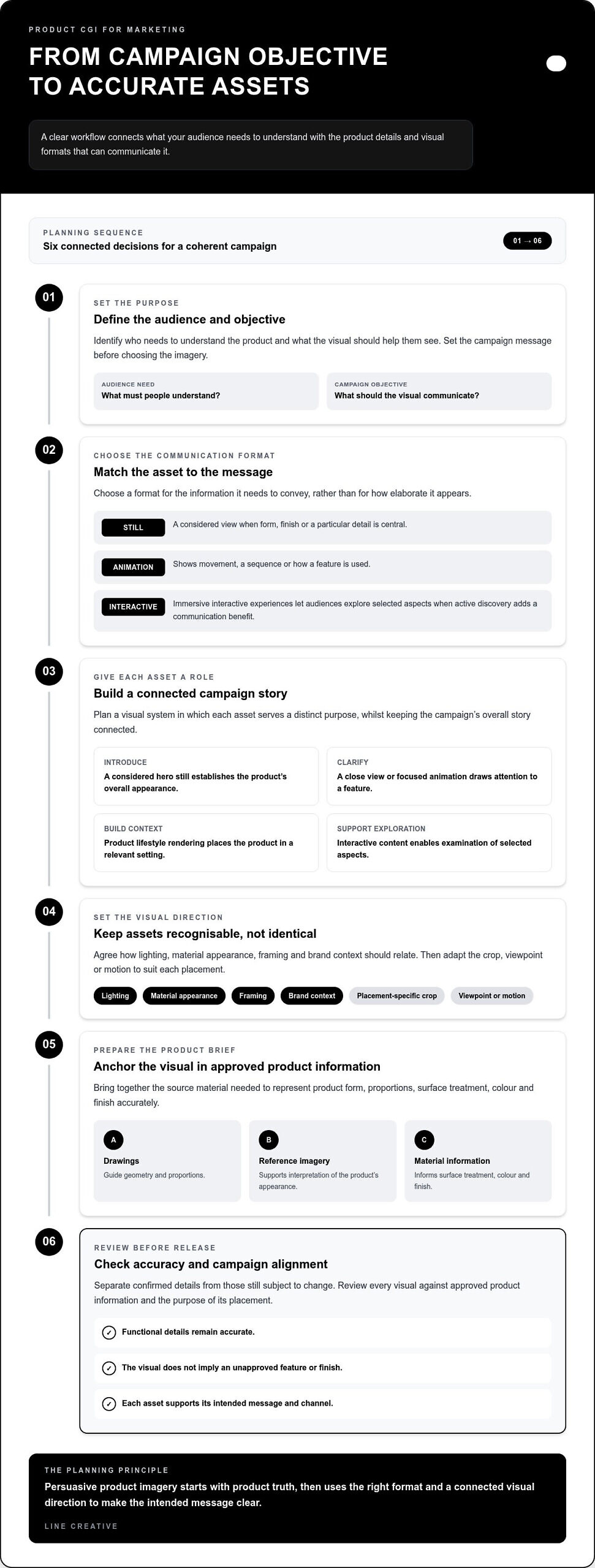
Faithful CGI starts with approved product references and technical specifications. Drawings can guide geometry and proportions; reference imagery and material information can inform surface treatment, colour and finish. Before production, identify which details are confirmed and which remain subject to change. This reduces the risk of presenting an unapproved feature as an established product fact.
Creative interpretation can shape lighting, composition and context, but it should not alter a functional detail or imply a finish the product does not have. Keep the visual story persuasive and anchored to product truth. Accurate imagery can support trust by giving audiences a clear, consistent representation to assess, but it cannot guarantee a commercial outcome on its own. Partnering with specialists such as Big Voice – Digital Marketing Agency can help businesses connect strong creative assets to broader digital strategies that focus on tangible commercial results rather than vanity metrics.
How product CGI turns a campaign story into a coherent visual system
A campaign rarely asks one image to do everything. One asset may introduce a product, another clarify a feature, and another place it in a recognisable brand context. Planning product CGI for marketing as a visual system gives each asset a distinct role while keeping the overall story connected.
Match the visual format to the message
Start with the audience’s information need. A still image offers a clear, controlled view when form, finish or a particular detail is central. Animation can explain a sequence, movement or interaction that a single frame cannot convey as directly. Immersive interactive experiences are useful when letting people explore the product adds a distinct communication benefit, rather than complexity for its own sake.
Use this simple matrix to connect campaign objectives with asset choices:
- Introduce the product: a considered hero still establishes its overall appearance and gives the campaign a clear visual anchor.
- Clarify a feature: a close view or focused animation directs attention to the relevant detail or sequence.
- Build brand context: product lifestyle rendering places the product in a setting that helps explain its intended use or audience.
- Support exploration: an interactive experience lets audiences examine selected aspects when active discovery is part of the message.
Build consistency across campaign touchpoints
Consistency does not mean publishing identical content everywhere. It means defining a visual direction that can adapt to each asset’s role. Agree how lighting, material appearance, framing and brand context should relate, then select the crop, viewpoint or motion that suits each placement. This creates recognition across campaign touchpoints without asking every visual to carry the same message.
Plan the asset set around the campaign sequence. An introduction may need a strong overall view; supporting content can focus on a feature or setting. Record approved visual choices so later assets remain aligned, and review adaptations against product truth and the purpose of each placement. This prevents a polished campaign from becoming a collection of disconnected images.
For product-in-context imagery, a product visualisation portfolio can help you assess how composition and setting shape a visual story. A defined system gives your team a practical framework for commissioning and reviewing assets, while leaving room for each channel to communicate in the format its audience needs.
How to brief product CGI for marketing without losing product truth
A strong CGI brief links product references, audience needs and intended asset use, giving the creative process a clear standard for accuracy and purpose. Without that alignment, polished visuals can misrepresent a feature, miss the campaign message or require avoidable revisions.
What to include in a product CGI brief
Begin with the audience and objective: who needs to understand the product, and what should the visual help them see? Then define the campaign message, intended channels and required asset formats. This gives the CGI team a basis for planning a coordinated set of outputs rather than treating each image or animation as an isolated request.
Assemble source material that establishes product truth. Drawings can clarify geometry and proportions; approved reference imagery can show appearance and details; material information can guide surface treatment and colour. Include technical specifications for the required files and any approved brand guidance. Flag features that must remain unchanged, as well as details still subject to revision.
Set a clear feedback and sign-off route before production begins. Identify who reviews product fidelity, who approves brand direction and who gives final delivery approval. A practical sequence is:
- Define: audience, objective and campaign message.
- Supply: approved drawings, imagery, material information and specifications.
- Plan: assets, formats, channels and visual direction.
- Review: product accuracy, composition and brand alignment.
- Approve: final assets against agreed technical requirements.
Review assets for fidelity and channel readiness
Use staged review checkpoints. First, compare shape, proportions, material appearance and visible product details with the approved references. Next, assess lighting, framing and brand context against the intended message. At final review, check that the composition suits its channel and that file formats and other technical requirements match the agreed delivery specifications.
Separate subjective preferences from corrections that protect product truth. A lighting adjustment may refine presentation; changing the apparent material or obscuring a functional detail may create a misleading impression. If you are weighing photorealistic product rendering against photography, assess how each approach supports accurate product communication and the campaign’s visual requirements.
For a CGI brief shaped around accurate, campaign-ready product visuals, explore Line Creative’s 3D rendering and CGI.
A strategic partnership for product CGI that serves the campaign
Product CGI is most effective when creative story and technical execution develop together. A collaborative studio can translate a campaign’s purpose into a visual approach, coordinate asset requirements and keep creative decisions aligned with approved product details. This supports clear communication across the work, rather than treating image production as separate from the campaign.
What a CGI studio contributes beyond image production
Line Creative creates product visualisation and CGI for marketing and brand communication. Its work brings visual storytelling and technical delivery together, helping product teams shape imagery around what audiences need to see. The studio has received multiple CGarchitect Awards and an SME UK Award, and its client list includes Epic Games. Its global client base spans different creative contexts, while each project’s visual direction remains specific to its purpose.
When assessing a studio’s approach, look beyond individual images to how product detail, composition and story work together. The product visualisation portfolio offers examples to assess for visual style and storytelling, helping you judge whether the work aligns with your brand’s communication needs.
Move from campaign objective to a clear next step
A considered CGI programme can give your brand a visual foundation for future campaigns. Its value lies in a coherent creative direction that can accommodate new stories while preserving a clear relationship between the imagery and the product. For your team, this means treating visual consistency as an ongoing part of brand communication, not simply a production preference.
Line Creative’s product visualisation work brings creative and technical considerations into the same conversation. The visual approach is shaped around the product story, campaign context and audience experience.
Set your next product launch in motion
Your next launch can establish a visual standard for the product stories that follow. Treat CGI not as a one-off campaign finish, but as part of how your brand develops its visual language over time. Each new product or launch stage can build on an established creative direction while making room for a distinct story.
This forward view also gives your team a reason to consider how visual communication may evolve alongside the brand. New formats and interactive technologies can create further ways to present products, provided they serve a clear communication purpose and remain grounded in product truth. Make visual choices that keep pace with audience expectations without losing sight of what the product can accurately represent.
Product CGI for marketing can help establish that direction when creative intent and technical execution work together. Line Creative’s product visualisation and CGI services support marketing and brand communication, with an approach shaped around each project’s visual requirements.
Discuss your product CGI project with Line Creative and take the next step towards a distinctive visual direction. Start with a clear campaign objective and the product story you want your audience to understand.
Frequently Asked Questions
Is product CGI suitable for a product that has not been manufactured yet?
Yes. CGI can depict a product before manufacture, helping teams prepare concept-stage communications. Treat those visuals as representations of a specific design version, not evidence of a finished item. Record the revision shown and flag unresolved options wherever assets circulate internally. If the design changes, your team can identify which images need review before reusing them in launch materials.
Can product CGI be used across different marketing channels?
Yes. A planned CGI asset set can serve several marketing channels, but channel use should be managed as an asset-mapping task. Assign each approved deliverable to a campaign moment and channel owner, then keep a record of its current version and permitted use. For businesses expanding their digital presence, partnering with branding and ecommerce specialists such as Senses Group helps ensure these visuals remain cohesive across online storefronts, preventing an outdated crop or superseded product depiction being selected as the campaign moves from launch communications to ongoing brand content.
How does product CGI communicate details that a standard image may not make clear?
CGI can make product information easier to parse by controlling visual hierarchy: isolate a component, reduce competing background detail or use contrast to distinguish adjacent surfaces. This is useful when a busy setting obscures a feature in a conventional image. The visual treatment should clarify what is present, not imply hidden capability. Keep the focal point aligned with the viewer’s question and ground any interpretation in confirmed product information.
What information should a marketing team provide for product CGI?
A useful brief includes approved design references, the target audience, campaign purpose, brand guidance, intended placements and delivery specifications. Add two controls: identify which reference takes precedence if drawings and images differ, and name the person authorised to consolidate feedback. A short list of unresolved design decisions also helps reviewers separate confirmed characteristics from provisional choices, reducing the risk that comments introduce unintended product changes during visual development.
Is product CGI the same as product photography?
Not exactly. Product photography records a physical subject through a camera, whereas CGI builds the image from a digital three-dimensional scene. That distinction concerns what the image is based on; neither approach is automatically better. For CGI vs. Traditional Photography, consider whether the physical item exists in the required form and what the visual must communicate. You can choose an approach asset by asset, according to its purpose and source material.
Can product CGI communicate a product story as well as its appearance?
Yes. A sequence of campaign assets can shape how an audience encounters a product story, moving from recognition to a closer understanding of its relevance to the brand. That narrative can express design intent or intended use, provided each implication is supported by approved information. Before release, review the story as a whole: check that the message builds meaning without implying a capability, benefit or feature the product does not have.